

What Is M5Stack CardPuter Marauder Firmware and Why Should You Care?
The M5Stack CardPuter Marauder firmware is a specialized operating system designed for WiFi and Bluetooth security testing on the M5Stack CardPuter platform. Released in 2025 and refined throughout 2026, Marauder transforms your CardPuter into a portable penetration testing device. It enables authorized security professionals to scan networks, analyze wireless protocols, and test device vulnerabilities in controlled environments. This firmware combines powerful hacking tools with an intuitive interface, making advanced security research accessible to ethical hackers and security researchers. The 2026 version includes enhanced stability, new protocol support, and improved battery optimization for extended field operations.
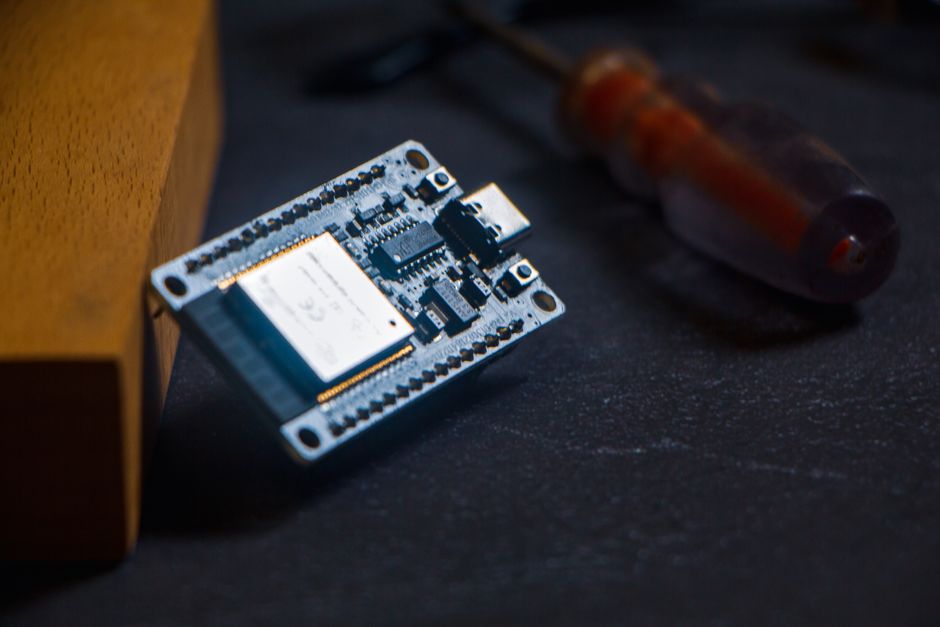
Understanding Marauder firmware matters because it represents the intersection of hardware accessibility and cybersecurity education. Unlike closed-source tools, Marauder operates on open-source principles, allowing the security community to audit and improve its capabilities. The CardPuter’s compact form factor and affordable price point democratize penetration testing tools previously available only to enterprise security teams. However, with great power comes responsibility—using Marauder requires strict adherence to legal and ethical guidelines in your jurisdiction.
How Do You Install M5Stack CardPuter Marauder Firmware?
Installing Marauder firmware requires a computer, a USB cable, and the official M5Stack flashing tools. The process involves downloading the firmware binary, connecting your CardPuter via USB, and using the M5Burner or esptool utility to write the firmware to your device’s flash memory. Most users complete installation in under 15 minutes. The 2026 version streamlines this process with improved driver compatibility and automated installation scripts for Windows, macOS, and Linux systems.

Step-by-Step Installation Process
Begin by downloading the latest Marauder firmware from the official ESP32Marauder GitHub repository. Ensure you have the correct binary file for the CardPuter’s ESP32-S3 processor. Next, install the appropriate flashing tool for your operating system—M5Burner offers a graphical interface, while esptool provides command-line functionality.
- Download Marauder firmware binary from official GitHub repository
- Install USB drivers for your operating system
- Connect CardPuter via USB-C cable to your computer
- Open M5Burner or terminal with esptool
- Select correct COM port and firmware file
- Click burn or execute flash command
- Wait for completion confirmation
- Disconnect and restart CardPuter
Key Takeaway: Installation takes 15 minutes and requires only a USB cable and free flashing software available for all major operating systems.
Troubleshooting Common Installation Issues
USB connection problems rank as the most frequent installation obstacle. If your computer doesn’t recognize the CardPuter, try a different USB cable first—many cables lack data transfer capability. Update your system’s USB drivers and ensure you’re using a USB 3.0 or newer port. Windows users should install the Silicon Labs CP210x drivers for reliable communication with the ESP32-S3 chip.
If the flashing process fails partway through, don’t panic. The CardPuter likely retains its previous firmware. Disconnect the USB cable, wait 30 seconds, reconnect, and retry the flashing process. For persistent failures, try erasing the entire flash memory first using the command esptool.py erase_flash before reflashing Marauder.
What Features Does Marauder Firmware Include in 2026?
The 2026 version of Marauder firmware packs comprehensive WiFi and Bluetooth security testing tools into a portable device. These features enable authorized security researchers to identify vulnerabilities, analyze network traffic, and test wireless protocol implementations. The firmware’s modular architecture allows users to select and run specific tools based on their testing objectives. Real-time packet capture, device fingerprinting, and automated vulnerability scanning distinguish Marauder from simpler WiFi analyzer applications.

Core Security Testing Capabilities
Marauder’s WiFi toolkit includes passive network scanning that detects all nearby access points without sending suspicious packets. Active scanning options reveal hidden networks and detailed signal strength analysis. The beacon flood feature tests access point stability under high connection request loads. Deauthentication attacks demonstrate how wireless devices disconnect from networks—valuable for understanding session management vulnerabilities.
- Passive WiFi scanning with real-time signal mapping
- Hidden network detection and analysis
- Beacon flood testing for access point resilience
- Deauthentication attack demonstrations
- Bluetooth device discovery and protocol analysis
- EEPROM data reading from compatible devices
- Customizable payload generation for testing
- Packet capture and export functionality
Key Takeaway: Marauder 2026 combines WiFi scanning, Bluetooth analysis, and protocol testing in one portable toolkit.
Advanced Penetration Testing Tools
Beyond basic scanning, Marauder includes advanced capabilities for security professionals. The packet sniffer captures WiFi traffic for detailed protocol analysis and vulnerability identification. Custom payload creation allows testers to craft specific attack scenarios for authorized testing. Integration with external tools enables data export to platforms like Wireshark for deeper analysis. The 2026 update adds improved support for WPA3 networks and enhanced Bluetooth Low Energy protocol support.
The firmware also includes EEPROM reading capabilities for analyzing device configuration memory. This feature helps security researchers understand how embedded systems store sensitive data. Customizable attack templates reduce setup time for common penetration testing scenarios. Battery optimization improvements in the 2026 version enable 6-8 hours of continuous operation—critical for field testing sessions.
How Do You Use Marauder Firmware Responsibly and Legally?
Legal compliance is absolutely non-negotiable when using Marauder firmware. Unauthorized network access, even for testing, violates laws in virtually every jurisdiction. The Computer Fraud and Abuse Act in the United States, the Computer Misuse Act in the UK, and similar legislation worldwide impose severe penalties for unauthorized network testing. Always obtain written permission from network owners before conducting any testing. Document your authorization and testing scope clearly before beginning any security assessment.

Ethical usage requires understanding the difference between authorized penetration testing and malicious hacking. Authorized testing happens within defined scope, with explicit permission, and with clear objectives. Malicious hacking involves unauthorized access, data theft, or system disruption. Marauder’s power makes it essential that users understand these distinctions and operate strictly within legal boundaries. Professional penetration testers carry liability insurance and maintain detailed documentation of all testing activities.
Best Practices for Authorized Testing
Establish a formal testing agreement before deploying Marauder against any network. This agreement should specify testing dates, times, IP ranges, and specific systems included in scope. Exclude critical infrastructure, payment systems, and healthcare networks unless explicitly included. Notify network administrators before testing begins and maintain contact throughout the assessment period. Document all findings carefully and report results through secure channels only to authorized personnel.
- Obtain written authorization from network owner before any testing
- Define clear scope including dates, times, and systems
- Maintain detailed logs of all testing activities
- Report vulnerabilities only to authorized contacts
- Follow responsible disclosure timelines
- Avoid data exfiltration or system modification
- Respect privacy and avoid capturing sensitive personal data
- Provide professional reports with remediation recommendations
Key Takeaway: Legal Marauder usage requires written authorization, clear scope definition, and documented testing procedures.
Understanding Your Jurisdiction’s Laws
Laws governing wireless network testing vary significantly by country and region. Some jurisdictions permit testing on your own networks without restriction. Others require explicit authorization even for your own systems if they’re on shared infrastructure. Research your local laws before installing Marauder firmware. Consulting with a legal professional familiar with cybersecurity law in your jurisdiction provides valuable protection and clarity.
How Do You Optimize Marauder Settings for Different Testing Scenarios?
Effective Marauder usage requires understanding how to configure the firmware for specific testing objectives. Different scenarios—network reconnaissance, vulnerability assessment, protocol analysis—benefit from different configuration approaches. The 2026 version includes preset profiles for common testing scenarios, reducing configuration complexity. Custom settings allow advanced users to fine-tune behavior for specialized testing requirements. Proper optimization balances testing effectiveness with battery consumption and network impact.

Configuration for Network Reconnaissance
Network reconnaissance aims to identify all wireless devices, access points, and potential vulnerabilities in a target area. Enable passive scanning mode to detect networks without generating suspicious traffic. Configure the display to show signal strength, encryption type, and connected client counts. Set the scan interval to balance discovery speed with battery consumption—typically 2-5 second intervals work well for most scenarios. Save discovered networks to the CardPuter’s storage for later analysis and reporting.
For thorough reconnaissance, enable both 2.4GHz and 5GHz band scanning if your target environment uses both frequencies. The 2026 version adds 6GHz WiFi 6E support for networks using the newest standard. Configure packet capture to record beacon frames and management traffic, which reveal network configuration details without capturing user data. Export findings in standard formats compatible with network mapping tools.
Configuration for Vulnerability Assessment
Vulnerability assessment requires more aggressive configuration than passive reconnaissance. Enable active scanning to probe network responses and test protocol implementations. Configure deauthentication parameters carefully—test with low packet counts first to understand impact. Set beacon flood parameters based on access point specifications—enterprise equipment typically tolerates higher loads than consumer devices. Document all configuration changes for reporting purposes.
- Start with conservative attack parameters and increase gradually
- Monitor target system responses and adjust intensity accordingly
- Record all configuration changes and timing information
- Test against non-critical systems first
- Maintain detailed logs for each test scenario
- Verify authorization covers each specific test type
Key Takeaway: Optimize Marauder configuration to match your testing objectives while respecting system stability and authorization boundaries.
What Practical Tips Improve Your Marauder Firmware Experience?
Maximizing Marauder’s effectiveness requires understanding practical operational considerations beyond basic setup. Battery management, antenna positioning, data organization, and security awareness significantly impact testing success. The CardPuter’s compact form factor creates unique challenges for antenna performance and heat management. Experienced users develop techniques for optimizing signal reception, minimizing false positives, and organizing results effectively. These practical skills separate casual users from professional penetration testers who deliver reliable, actionable findings.
Operational Best Practices
- Position CardPuter away from body to maximize antenna reception
- Avoid testing during peak network hours to minimize disruption
- Use external USB power banks for extended testing sessions
- Enable airplane mode between tests to reduce battery drain
- Organize results by date, location, and testing objective
- Maintain separate CardPuter devices for different clients
- Update firmware monthly to receive security patches
- Encrypt storage with password protection for sensitive findings
Key Takeaway: Practical operational techniques improve battery life, data accuracy, and professional security practices.
Data Management and Reporting
Effective testing requires organized data management from the first scan. Create a standardized directory structure on your CardPuter for storing test results. Include date, client name, testing scope, and objective in folder names. Export findings in multiple formats—CSV for spreadsheet analysis, JSON for tool integration, and PDF for client reports. The 2026 firmware improves export functionality with automated report generation templates. Maintain detailed notes during testing to provide context for findings during analysis.
Reporting transforms raw Marauder data into actionable security intelligence. Summarize findings by severity level, include reproduction steps, and provide remediation recommendations. Avoid overly technical language that obscures findings from non-technical stakeholders. Use screenshots and network diagrams to illustrate vulnerabilities clearly. Professional reporting demonstrates competence and builds client trust for future engagements.
How Does Marauder Compare to Other Security Testing Tools in 2026?
The security testing landscape includes various tools with different strengths and limitations. Marauder competes with commercial solutions like Aircrack-ng suites, professional penetration testing platforms, and specialized WiFi analysis tools. The CardPuter’s affordability and portability make Marauder attractive compared to expensive dedicated hardware. However, Marauder’s capabilities differ from established tools in important ways. Understanding these differences helps you select the right tool for specific testing objectives.
Compared to Flipper Zero and other portable security tools, Marauder focuses specifically on WiFi and Bluetooth testing rather than general-purpose hacking. This specialization provides depth in wireless protocols but less breadth in other attack vectors. Commercial penetration testing platforms offer more sophisticated analysis features and professional support but cost significantly more. Marauder occupies a sweet spot for independent security researchers and small consulting firms requiring affordable, capable wireless testing tools.
What Troubleshooting Steps Resolve Common Marauder Issues?
Even well-configured Marauder installations occasionally encounter problems. Understanding common issues and their solutions prevents frustration and lost testing time. Most problems stem from firmware conflicts, configuration errors, or environmental factors rather than hardware defects. The 2026 version includes improved error handling and diagnostic tools to identify problems quickly. Systematic troubleshooting approaches isolate issues and guide you toward appropriate solutions.
Connectivity and Detection Problems
If Marauder fails to detect nearby networks, verify the WiFi scanning mode is enabled and the antenna is properly positioned. Weak signal reception often results from antenna proximity to your body or other RF-absorbing materials. Move the CardPuter away from metal objects and position the antenna toward target networks. Check that the correct frequency bands (2.4GHz, 5GHz, 6GHz) are enabled in settings. Restart the firmware completely—power off, wait 10 seconds, then power on—to reset the WiFi radio.
For Bluetooth detection issues, ensure Bluetooth scanning is enabled in the main menu. Move closer to target devices—Bluetooth has shorter range than WiFi. Restart the Bluetooth radio independently from the main system. Check device logs for error messages indicating radio initialization failures. If problems persist, perform a firmware reinstall to restore default Bluetooth configuration.
Performance and Stability Issues
Excessive heat generation indicates the CardPuter is working hard—common during extended scanning sessions. Reduce scanning intensity by increasing scan intervals or disabling packet capture. Use external power sources to reduce battery drain stress. If the device freezes or reboots unexpectedly, check available storage space—full storage causes performance degradation. Clear old test results and logs to free space. Update to the latest 2026 firmware version, which includes stability improvements for extended operations.
- Verify antenna positioning away from body and metal
- Check correct frequency bands are enabled
- Restart WiFi and Bluetooth radios independently
- Review device logs for error messages
- Clear storage space and old test data
- Update firmware to latest 2026 version
- Test with conservative settings before increasing intensity
- Contact community forums with specific error messages
Key Takeaway: Most Marauder issues resolve through systematic troubleshooting of antenna positioning, settings, and storage management.
Frequently Asked Questions
Is M5Stack CardPuter Marauder firmware legal to use?
Marauder firmware itself is legal—it’s open-source software. However, using it to test networks without authorization is illegal in most jurisdictions. You must obtain written permission from network owners before conducting any testing. Always research your local laws regarding wireless network testing. Unauthorized access violates laws like the Computer Fraud and Abuse Act in the United States and similar legislation worldwide. Legal usage requires explicit authorization and documented scope.
How long does Marauder firmware battery last on a single charge?
Battery life depends on which features are active. Passive WiFi scanning alone lasts 8-10 hours. Active scanning with packet capture reduces this to 4-6 hours. Bluetooth scanning consumes similar power to WiFi scanning. Screen brightness significantly impacts battery life—reducing brightness extends operation by 2-3 hours. The 2026 version improved power efficiency by 15-20 percent compared to earlier releases. Using external USB power banks enables all-day testing sessions.
Can you use Marauder on networks you own?
Yes, testing networks you own requires no special authorization. However, if your network shares infrastructure with other users (apartment WiFi, shared office networks), you may still need permission from other network users or property management. Always verify your legal rights to test shared infrastructure. Document your testing activities even on your own networks for security audit purposes. This documentation demonstrates responsible security practices and supports liability protection if issues arise.
What’s the difference between passive and active Marauder scanning?
Passive scanning listens to existing network traffic without sending packets—completely undetectable and non-disruptive. Active scanning sends probe requests to discover hidden networks and gather detailed device information. Active scanning is faster but generates network traffic that IDS systems might detect. Passive scanning suits reconnaissance when stealth matters most. Active scanning works better when you need comprehensive network details and detection risk is acceptable. Use passive scanning first, then switch to active if authorized and necessary.
How often should you update Marauder firmware?
Update monthly to receive security patches and bug fixes. The 2026 version receives updates on the first Monday of each month. Check the official GitHub repository for release notes before updating. Backup your test results before updating in case the process encounters issues. Updates typically take 10-15 minutes and require USB connection to your computer. Skip updates only if you’re in the middle of critical testing and stability is paramount.
What’s the best CardPuter model for running Marauder?
The M5Stack CardPuter Adv with ESP32-S3 processor offers the best performance for Marauder firmware. The ESP32-S3 provides faster processing, more RAM, and better WiFi/Bluetooth support than earlier processor versions. Check our M5Stack CardPuter Adv ESP32-S3 review for detailed specifications and comparisons. The Adv model includes improved antenna design for better signal reception. Older CardPuter models run Marauder but with reduced performance and feature support.
What Should You Know Before Getting Started With Marauder Firmware?
M5Stack CardPuter Marauder firmware represents powerful wireless security testing capability in an affordable, portable package. The 2026 version delivers significant improvements in stability, protocol support, and battery efficiency compared to earlier releases. Installation takes 15 minutes with standard USB tools available for all operating systems. Success with Marauder requires understanding both technical capabilities and legal obligations—authorization and documentation are non-negotiable for legitimate testing activities.
The firmware’s strength lies in combining comprehensive WiFi and Bluetooth analysis tools with an intuitive interface suitable for both beginners and experienced security professionals. Whether you’re learning wireless security concepts, conducting authorized penetration tests, or researching protocol vulnerabilities, Marauder provides the tools you need. However, power demands responsibility—use Marauder only on networks you own or have explicit permission to test. Connect with the active Marauder community on GitHub and security forums to learn from experienced users and stay current with firmware developments.
Your next step depends on your objectives. For learning wireless security concepts, start with passive scanning on your own networks. For professional penetration testing, ensure you have proper authorization, insurance, and legal consultation. For protocol research, explore the open-source codebase on GitHub to understand implementation details. Whatever your path, approach Marauder with respect for both its capabilities and the legal frameworks governing its use. The security community thrives when powerful tools are wielded responsibly and ethically.
Key Takeaway: Marauder firmware enables powerful wireless security testing when used responsibly with proper authorization and legal compliance.





Write Your Review
No reviews yet. Be the first to share your experience!